

Why Airline Seat Maps Don’t Show How Full Your Flight Really Is
If you have ever opened your airline app, tapped on the seat map, and tried to guess how full your flight is, you are not alone. It is a common habit among frequent travellers, especially when hoping for an upgrade, planning a same-day flight change, or simply feeling curious.
The problem is that seat maps are a poor indicator of how many seats are actually left to be sold. Those empty-looking rows rarely tell the full story.
If you want a more accurate picture of flight availability, there is a better tool to use.
Why seat maps are misleading
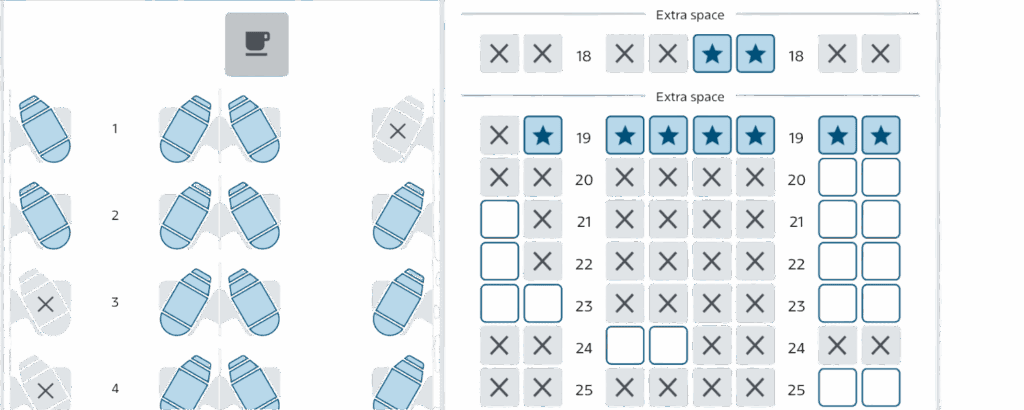
Seat maps only show which seats have been assigned, not which seats have been sold.
Many passengers do not select seats in advance. Some fares include seat selection at check-in only, some travellers wait intentionally, and others are assigned seats automatically by the airline closer to departure. On top of that, blocked seats for elites, families, or operational reasons can appear empty even when the cabin is nearly full.
Seeing eight unselected seats does not mean there are eight seats left for sale.
This is where flight availability data becomes far more useful than a visual seat map.
The tool frequent flyers actually use

One of the most commonly used tools for checking real flight availability is ExpertFlyer.
With even a free ExpertFlyer account, travellers can view availability by fare class, which gives insight into how many seats remain in each cabin.
You can access the tool at expertflyer.com.
Once logged in, navigate to Flight Availability, then enter your airline, flight number, date, and route. After searching, you will see your flight details along with a list of letters and numbers. This is the information that matters.
How to read ExpertFlyer availability
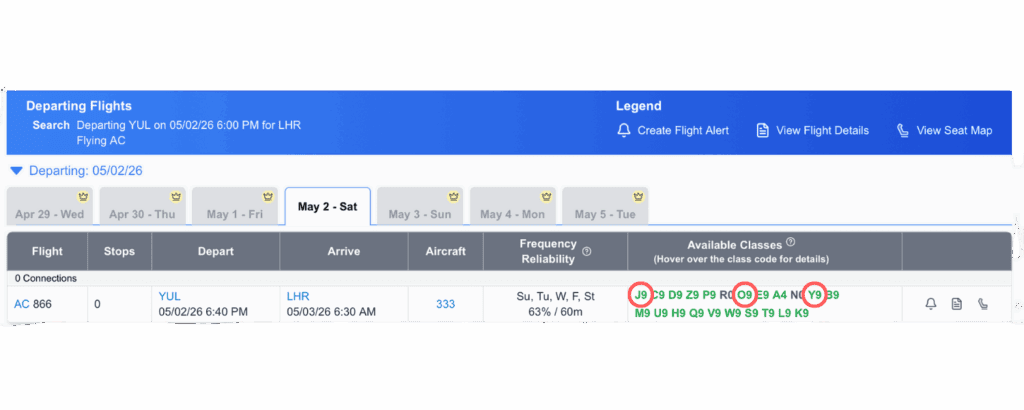
ExpertFlyer displays availability using booking class codes. Each letter represents a fare bucket tied to a cabin, and the number indicates how many seats are available in that bucket, capped at nine.
For example, in the above screenshot:
- J9 means at least nine business class seats are available.
- O9 means at least nine premium economy seats are available.
- Y9 means at least nine economy seats are available.
The number does not always reflect the exact seat count, but it confirms minimum availability. Seeing a higher number generally means the cabin is more open.
You will also see other letters and numbers listed. These typically represent different fare types within the same cabin and can usually be ignored if your goal is to understand overall seat availability.
Why this matters for strategic travellers
Understanding availability can be especially helpful when flying with Canadian carriers or on long-haul routes where upgrades are competitive.
When more seats are available in business class, airlines are often more willing to offer paid upgrades at lower prices. Similarly, travellers with elite status or upgrade instruments have a better chance of clearing into a higher cabin when availability is strong.
This information can also be useful when monitoring earlier flights on the same route, particularly for same-day changes or standby travel when permitted by the fare.
The Bottom Line

Seat maps show seat assignments, not unsold seats. If you want a clearer picture of how full your flight really is, flight availability data is the better option.
Tools like ExpertFlyer help demystify what is happening behind the scenes and give frequent travellers an edge when it comes to upgrades, planning, and flexibility.


Follow me on Instagram and Tiktok for travel tips hacks that’ll make your adventures unforgettable!
@thecanadianjetsetter on INSTAGRAM →
@thecanadianjetsetter on TIKTOK →
follow me ON Instagram →
FOLLOW me on tiktok →


Comments will load here
Be the first to comment